

Imagine a world where every person can have a positive digital experience on the web. Web accessibility was once a nice-to-have addition on a website or social media post. Now it is considered a crucial element to being inclusive.
You might be wondering, what is web accessibility?
Web accessibility refers to the ability of people with disabilities to access and independently consume digital content and applications (GAAD). It ensures that people with disability can use websites and digital tools just as easily as people without disability.

Why is it important to be digitally inclusive?
In Australia, there are 5.5 million people with a disability, that’s one in five people with a disability (ABS). By being digitally inclusive, you can provide our products, services, or information to people with physical and hidden disabilities.
The benefits for a business to be web accessible include:
- Opportunity to widen your market
- Loyalty from disability communities
- Strengthened brand image and reputation
- Improved SEO as many web accessibility standards overlap with good SEO practices.
Accessibility techniques (and we’ll cover some best practices further down) are designed to improve access for people with disability, but they often provide benefits for all people, offering better readability, comprehension, and findability.

Let’s take a closer look at website accessibility.
An accessible website is defined as the ability of people with disabilities being able to easily use and navigate websites effectively (ReciteMe). Having a website that is difficult to use, navigate, and find information creates barriers and feelings of frustration, exclusion, vulnerability and discrimination.
Good news, there is an internationally recognised benchmark for measuring the accessibility of websites: The Web Content Accessibility Guidelines, often known as WCAG. Under these guidelines, the principles of web accessibility are grouped into four categories:
- Perceivable: users must be able to perceive the information being presented
- Operable: users must be able to operate the digital interface (navigate the website)
- Understandable: users must be able to understand the information and how to operate the digital interface
- Robust: users must be able to access the content as technology advances (POUR).
The current version is WACG 2.0. Web developers and designers can use these guidelines and success criteria to address accessibility issues for people with disabilities.
WACG 2.0 has three levels of accessibility:
- Level A: the basic level, with the least strict requirements
- Level AA: the mid-level, which most organisations aim to meet
- Level AAA: the highest level, with very strict requirements. For example, to meet AAA standards, a website must have sign language interpretation for all pre-recorded audio.
Achieving Level AAA compliance is very challenging, so most organisations aim for Level AA to provide a good user experience for everyone.
How do you know if your website is accessible?
There are several free tools you can use to assess the accessibility of your website. Two notable tools are WAVE and Colour Contrast Analyser.
WAVE is a suite of web accessibility evaluation tools that help you make website content more accessible to individuals with disabilities. WAVE can identify many accessibility and WCAG errors, but also facilitates human evaluation of web content (WAVE).
The Colour Contrast Analyser by WebAIM allows you to easily determine the contrast ratio of a foreground and background colour. A strong contrast ratio aligns with guidelines set out in WCAG and makes your website easy to read.
Ten ways to make your website more accessible
Making these simple changes to your website will boost the accessibility of your product, service or content.
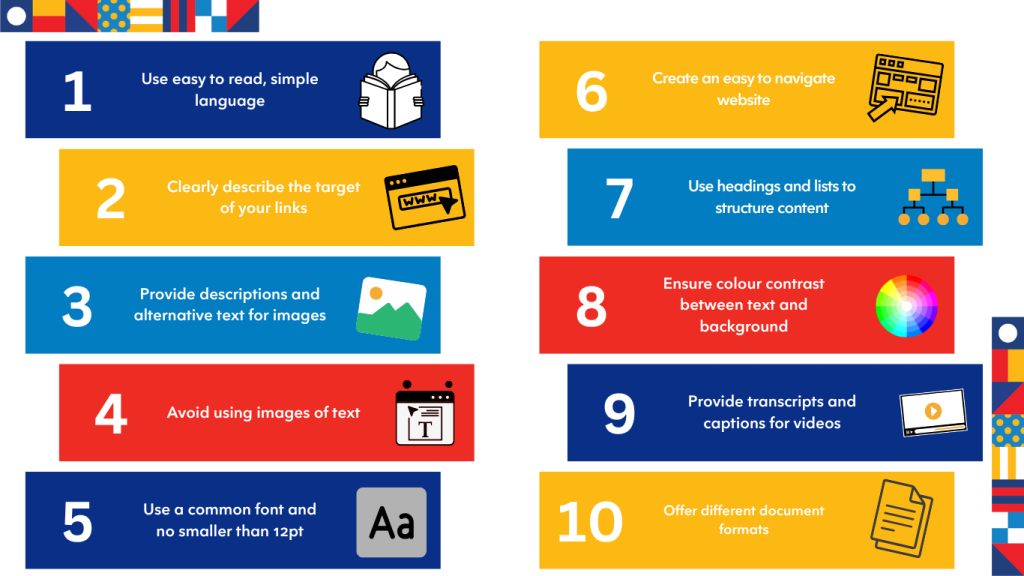
Let’s unpack these changes you can make
- Use easy-to-read, inclusive language
Use simple words and grammar that your audience can understand. This doesn’t mean using childish language but rather clear and straightforward language.
Use person-first language, which is respectful and inclusive. For example, say “person with disability” instead of “disabled person”. - Clearly describe the target of your links
Avoid vague link text like “More,” “Open,” or “Click here.” These words offer little context or indication of the link destination and make it harder for people who use screen readers or keyboard navigation to understand the purpose of the link.
If the link is for a document, include the download format in the link text, such as [Word] or [PDF]. - Provide descriptions and alternative text for images
Provide images that supply information or context with alt text. Be clear and concise with your description.
Avoid adding alt text for decorative images with no contextual value. This is important as it prevents screen readers from reading the file name of the image. - Avoid using images of text
Images of text can blur when zoomed in and are not customisable. Screen readers are not able to read the text within an image.
If you must use an image of text, include the same words in the alt text. - Use a common font and an appropriate size
Use common fonts and limit the number of fonts on your website. Examples include Arial, Verdana, Times New Roman, and Georgia.
Use at least 12pt font size for body text and avoid excessive use of bold, capitals, italics, and underlines. - Create an easy-to-navigate website
Make it easy for users to find information and move through your website. This is especially important for people using assistive technology like screen readers.
Provide navigation landmarks and a “Skip navigation” or “Skip to content” link to help users move around pages. - Use headings and lists to structure content
Headings help users understand the structure of content, and lists are easier to skim than paragraphs.
Screen reader software announces headings and list items, making it easier for people to find the information they need. - Ensure colour contrast between text and background
Use a colour contrast ratio that matches the WCAG to ensure that your website text is easy to read. - Provide transcripts and captions for videos
Use automatic captioning as a starting point, but manually edit captions to ensure accuracy.
Provide text transcripts of video dialogue, which can be accessed via a link under the video. - Offer different document formats
PDFs are not accessible for screen readers. Provide alternate formats like Word documents.
Embracing web accessibility
Web accessibility is essential for creating an inclusive online environment where everyone can participate equally. By implementing accessibility practices, you not only support individuals with disabilities but also enhance the overall user experience, improve SEO, and strengthen your brand’s reputation. Embracing the WCAG guidelines and tools ensures your website is welcoming and usable for all visitors. Let’s commit to making the digital world a more accessible place for everyone.